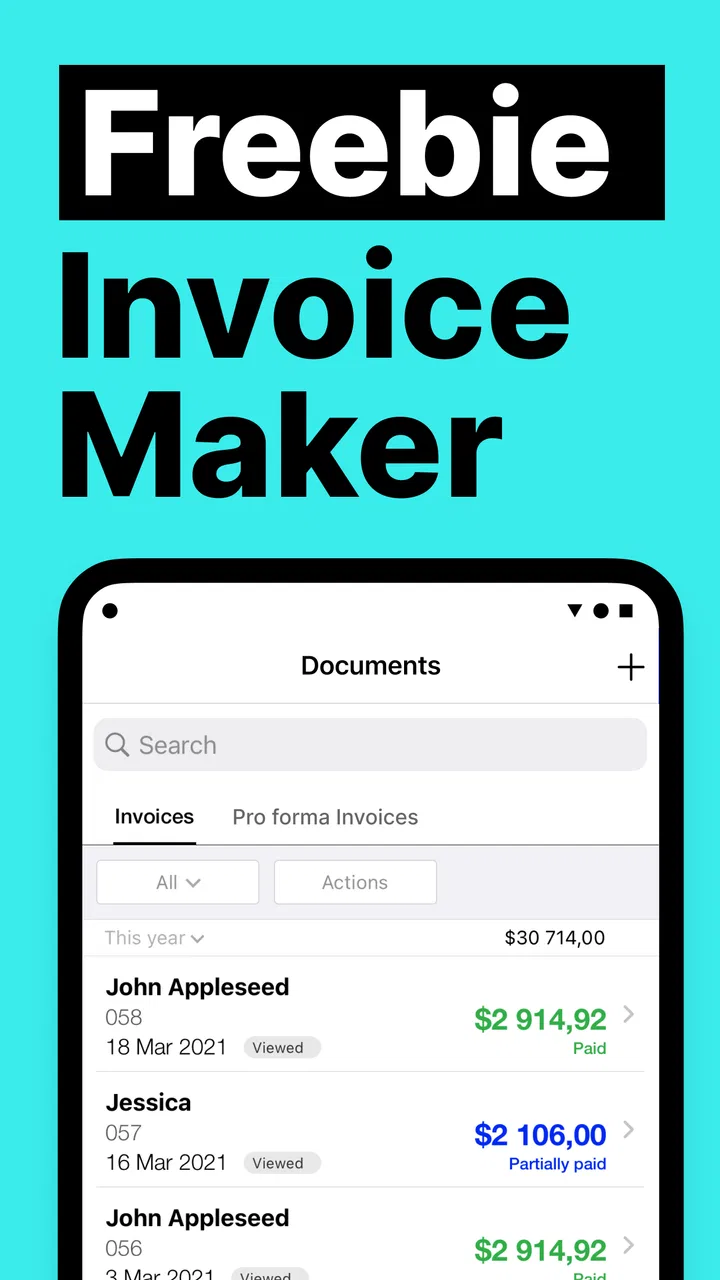
Freebie Invoice Estimate Maker
- 4.8
- Rating
- 100.00K
- Installs
- Free
- Price
 Analysis by App-foxy
I usually judge an invoice app by what happens after the first enthusiastic setup. Creating one attractive estimate is easy; keeping client details organized, sending consistent documents, and returning to the app month after month is the real test. Freebie Invoice Estimate Maker makes a strong first impression because it focuses on a practical business task without surrounding it with unnecessary complexity. I found it most appealing as a lightweight tool for freelancers, tradespeople, independent sellers, and small operators who need to prepare an invoice or estimate while away from a desk.
The app is a free Business application from Simple Apps s.r.o., with a 4.8 average from around 6.2 thousand ratings and more than 100 thousand installs. Those figures suggest that it has found a useful audience, but they are not the reason I would keep it installed. The more important question is whether its quick-document approach remains helpful once the initial novelty disappears. In my experience, the answer depends heavily on how complicated your billing routine is.
What using it feels like during the first week
During the first week, the main attraction is convenience. The app is designed around making invoices and estimates on the go, so it suits the moment when a customer asks for a written price after a visit, a job is finished away from the office, or a small business owner wants to send a professional-looking document before the day gets busy. I did not approach it as a full accounting system. I treated it as a mobile document-making tool, and that distinction makes its strengths much clearer.
You May Also Like

 Blood Strike: 2.5 Anniversary
Blood Strike’s Loadouts Turn Every Drop Into a Tactical Gamble
A close look at Blood Strike’s custom loadouts: how fast access to signature weapons reshapes its battle royale rhythm, rewards preparation, and narrows the gap between fights.

 Pandora - Music & Podcasts
Pandora’s Music Is Easy to Start, but Harder to Recover
Pandora’s strength is its low-effort path from a seed to a station. Its weak spot is how much confidence it asks you to place in connection, setup, and quiet recovery.

 8 Ball Pool
8 Ball Pool Is Built on Rivalries, Rematches, and Routine
A close look at the rivalries, rematches, shared routines, and unanswered safety questions that turn a quick pool match into a persistent mobile community.

 Samsung Music
Samsung Music’s Quiet Strength Is Playing What You Already Own
Its reach comes less from spectacle than from dependable access to a personal library. That simplicity is both the app’s strongest retention engine and its ceiling.

 AccuWeather: Weather Radar
AccuWeather Review: A Quick, Clear Forecast for Everyday Decisions
For everyday plans, the best forecast is the one you can understand quickly. AccuWeather makes rain timing, radar, and local conditions easy to act on, with a few trade-offs.

 Hill Climb Racing
Why Hill Climb Racing Still Turns Crashes Into One More Run
A tiny car, a bumpy hill and one more upgrade: Hill Climb Racing keeps resurfacing because its simple chaos makes every near-miss feel personal.
More From Our News Desk



A useful first habit is to prepare your business information before you need to send anything. Entering the same details repeatedly is one of the fastest ways to make a simple invoice workflow irritating. I would set up the information that appears regularly, then create a sample estimate and inspect it as if I were the customer. This catches awkward descriptions, unclear totals, and missing payment instructions before they appear on a real document.
The estimate side is particularly useful for service work. A painter, cleaner, repair specialist, tutor, photographer, or consultant can outline the expected work before committing to a final charge. That separation between an estimate and an invoice matters in everyday use: an estimate communicates an expected cost, while an invoice asks for payment after the work or sale. Keeping those purposes distinct reduces confusion when a customer changes the scope later.
I also like the possibility of working at the point of contact rather than waiting until I return to a computer. If I finish a small repair in the afternoon, I can prepare the charge while the details are still fresh. For a freelancer meeting a new client, an estimate created during the conversation can feel more useful than a promise to send something later. The benefit is not flashy; it is the removal of a small delay that often turns into a forgotten task.
The app is available at no upfront cost and is rated for Everyone, which makes it approachable for a broad range of users. Its current version is 26.7.10, and it supports Android starting with version 7.0. That older minimum operating-system requirement is helpful if your business phone is not new, although I would still keep the device and app updated where possible for a smoother experience.
One practical tip is to use a consistent naming style for items and services. “Repair,” “materials,” and “labor” may be enough for a quick personal note, but a customer-facing estimate benefits from descriptions that explain what is included. The app can help you produce the document, but it cannot decide whether your wording protects you from misunderstandings. Clear line descriptions are part of the workflow, not decoration.
The first-week appeal also comes from the app’s narrow purpose. Instead of learning a large bookkeeping platform, I can concentrate on preparing documents. That makes it less intimidating for someone who has never used business software. It is especially comfortable for a sole trader who does not need staff permissions, inventory management, or a complicated financial dashboard every time a customer requests a price.
Where the quick workflow is genuinely useful
Imagine a self-employed electrician who visits a customer to inspect a small job. The customer wants an approximate figure before approving the work. A mobile estimate maker is useful at that exact point: the electrician can record the work in plain language, show the expected charge, and leave with a clearer next step. If the customer accepts and the job is completed later, the invoice workflow provides a natural follow-up rather than forcing the electrician to recreate everything from memory.
A similar scenario applies to a market seller who takes occasional custom orders. The seller may not need a full retail platform, but still needs a professional record for a larger customer request. A simple invoice app can be a better fit than a spreadsheet because the document is built for sharing with a client, not merely for the seller’s private calculations.
That said, I would not confuse a polished document with complete financial control. Before relying on any invoice application, I would check the final totals, customer spelling, tax treatment, due date, and payment instructions myself. A mobile interface makes preparation faster, but speed can also encourage rushed review. The best workflow is create, preview, verify, then send.
Why it may still matter after the first month
After the first month, the question changes from “Can I make an invoice?” to “Does this save me enough effort to keep using it?” Freebie Invoice Estimate Maker earns recurring value when your work produces occasional or moderate numbers of invoices and estimates, especially when you are often away from a laptop. The app becomes a dependable pocket utility rather than something you open only to explore.
Its strongest long-term role is as a repeatable routine. After a job, I can record the customer and work while the information is current. Before a job, I can prepare an estimate without opening a broader accounting package. That creates two useful checkpoints in the workday: one for agreeing on scope and another for requesting payment. A tool that supports both moments can become part of the business habit.
For occasional users, the free entry point is important. Someone testing self-employment or handling a small side business may not want to commit immediately to a subscription-based accounting service. The app gives that person a low-risk way to see whether mobile invoicing fits their routine. However, “free” should not be interpreted as “everything will always be enough for every business.” The application includes in-app purchases ranging from $5.99 to $199.99 per item, so I would review the available options carefully before building a workflow around features that may require payment.
That pricing range is also a reason to decide early what you actually need. If you only create a few straightforward documents, the free experience may be sufficient. If you expect frequent billing, more polished customization, or a broader set of business tools, compare the paid choices with established accounting services before spending. The right purchase is not the one with the longest feature list; it is the one that removes a recurring problem without creating a new monthly obligation or learning curve.
A useful long-term technique is to treat every estimate as a record of expectations, not just a price. Write down the scope in enough detail that you can later explain why the final invoice changed. For example, separate the original work from additional materials or customer-requested changes. This makes the app more valuable because it supports clearer communication, even though the responsibility for accurate documentation remains with you.
I would also keep a separate reconciliation habit. At the end of a week, review which invoices were paid, which are outstanding, and which estimates became real jobs. If the app does not cover the full tracking process you need, pair it with a simple bookkeeping routine rather than assuming document creation equals accounts receivable management. That is one of the most important trade-offs: it can simplify the front end of billing without replacing every back-office task.
Who gets the most lasting value
This app makes the most sense for a solo professional who values speed over deep business administration. A mobile tradesperson, independent consultant, home-service provider, tutor, designer, or small repair business may appreciate having estimates and invoices close at hand. It is also a sensible starting point for a new operator who wants to look organized before investing in a larger software system.
The fit is weaker for a growing company with several people preparing documents, complex tax requirements, stock control, recurring billing, or a need for detailed reports. In those situations, an accounting platform or industry-specific system is usually better because the document is only one part of the operation. A spreadsheet may even be preferable for someone who wants complete control over calculations and already has a reliable template, while a full bookkeeping service is stronger for someone who needs payment reconciliation and financial reporting in one place.
Compared with paper forms, the app is more convenient and easier to standardize. Compared with a spreadsheet, it is more focused on producing a customer-facing invoice or estimate. Compared with full accounting software, it is less likely to overwhelm a beginner, but it also should not be expected to provide the same depth. I see it as the middle option: more practical than improvised documents, lighter than a complete financial system.
What maintenance feels like over time
The maintenance burden is fairly manageable if your business details stay stable. The real work is not opening the app; it is keeping the information inside each document accurate. Business names, contact details, tax information, payment instructions, service descriptions, and prices can all become outdated. I would schedule a short review whenever my rates or payment terms change, rather than waiting until a customer points out an old detail.
There is also a device-maintenance question. Because this is a mobile-first workflow, losing access to the phone or changing devices can interrupt billing at an inconvenient moment. I would not rely on any invoice app as the only place where important financial records exist. Keep appropriate copies of completed documents and maintain a separate record of payments and outstanding balances. That is not a criticism unique to this application; it is a sensible safeguard for any phone-based business tool.
Another maintenance task is consistency. If one customer receives an estimate with detailed line items and another receives a vague total, the difference can affect how professional and trustworthy the business feels. I would create a personal checklist and use it before sending: customer identity, service description, quantity or scope, total, payment terms, and document type. This takes less time than correcting an unclear invoice after it has been sent.
The developer is Simple Apps s.r.o., and the app has been available since August 3, 2022. Its continued presence and current version indicate an established product rather than a brand-new experiment, but I still recommend treating updates as part of normal maintenance. Install updates when practical, test the workflow after a significant change, and avoid waiting until an urgent customer request to discover that your usual process needs adjustment.
For a very small operation, this maintenance is reasonable. For a business that issues many documents each day, the manual checking can become the hidden cost. At that point, automation, customer history, payment status, and reporting may matter more than the ability to create a document quickly. The app’s simplicity is an advantage until the business grows beyond the simple workflow it was chosen to support.
Where repeated use can become tiring
The first source of fatigue is repetition. If you repeatedly enter similar customer information, line items, or terms, even a fast interface can start to feel like administrative work. The app reduces the friction of making a document, but it cannot eliminate the need to review every invoice. For a business with many recurring clients, I would compare the time saved against a system designed around customer records and recurring billing.
The second source is the boundary between invoicing and accounting. A person may install this app expecting it to answer every financial question: what has been paid, what is overdue, how much tax is owed, and how profitable each service is. That expectation can lead to disappointment. I would choose it specifically for invoices and estimates, then decide separately how to handle bookkeeping, payment tracking, expenses, and tax records.
In-app purchases may create another point of hesitation. The app is free to install, but the available purchase range means that some users will need to evaluate the cost of expanding their workflow. I would avoid paying simply because a feature sounds professional. First identify the repeated task that is slowing you down, then determine whether the purchase solves it often enough to justify the expense. For a business with only occasional billing, a paid upgrade may not provide meaningful value.
There is also a subtle human problem: mobile convenience can encourage sending documents too quickly. When I am standing outside a customer’s property or moving between appointments, I am more likely to tap through a form without checking whether the estimate includes every assumption. The best way to avoid this is to separate creation from approval. Prepare the document on the phone, pause, preview it, and read it as someone unfamiliar with the job would.
Users who need highly specialized regional invoicing rules should be cautious about choosing any lightweight app without checking their own obligations. The application can make a document look organized, but legal and tax requirements depend on the business and location. If compliance is central to your work, I would favor software built around those requirements or confirm the format with an accountant before relying on it.
Finally, the app may feel less satisfying for people who enjoy detailed dashboards and automation. That is not necessarily a flaw. A focused tool can be refreshing when a larger platform feels excessive, but the same focus becomes limiting when your business needs a central system of record. The right choice depends on whether you want a fast document maker or a complete administrative workspace.
My long-term verdict
Freebie Invoice Estimate Maker earns lasting space on my phone when I think of it as a practical billing companion, not a replacement for accounting software. Its first-week appeal is real: it helps turn a customer conversation, completed job, or pricing request into a more formal document without requiring a large setup. Its month-to-month value comes from repeating that small action reliably, particularly for people who work away from a desk.
I would recommend it to a solo business owner who needs straightforward estimates and invoices, wants a free starting point, and is willing to maintain a separate habit for payment tracking and financial records. The Everyone age rating and Android 7.0 support make it accessible to many users, while the strong average rating and growing install base suggest that the basic idea resonates with other small-business users.
I would skip it if you need multi-user administration, deep accounting, detailed inventory, advanced automation, or a complete tax workflow. In those cases, a larger accounting product will probably feel better after the initial learning period because it can connect more parts of the business. I would also skip it if you dislike checking documents manually; no invoice tool can compensate for inaccurate descriptions, totals, or payment terms.
My final recommendation is to test it with a realistic week of work rather than a single demonstration invoice. Create an estimate, revise the scope, turn the finished work into an invoice, save the records appropriately, and review what remains to be tracked outside the app. If that routine feels lighter than your current method, the app has earned a place in your business. Its lasting value is not novelty but dependable reduction of small billing delays.
For me, that is a worthwhile role. It is focused, approachable, and useful at the exact moment when a business owner needs to look organized without opening a complicated system. Just keep its boundaries in view, review every document before sending it, and make sure your wider bookkeeping process lives somewhere reliable as well. Used that way, Freebie Invoice Estimate Maker is a sensible free tool for mobile invoicing and estimates, with enough practical value to remain useful long after the first week.
FAQs for Freebie Invoice Estimate Maker
01What is Freebie Invoice Estimate Maker used for?
Freebie Invoice Estimate Maker is designed to help freelancers, contractors, small businesses, and independent service providers create professional-looking invoices and estimates from a mobile device. After reviewing the app, its main value is convenience: you can prepare billing documents while working remotely, organize customer details, describe services or products, add prices, and share the finished document without relying on desktop accounting software.
02Can I create both invoices and estimates with Freebie Invoice Estimate Maker?
Yes, the app supports creating both invoices and estimates, which makes it useful throughout the sales and payment process. An estimate can be prepared before work begins, while an invoice can be issued after products or services are delivered. Users should still check the totals, tax fields, customer information, payment terms, and document status carefully before sending anything to a client.
03Does Freebie Invoice Estimate Maker work for small businesses and freelancers?
The app is particularly suited to freelancers, sole traders, contractors, and small businesses that need straightforward billing tools rather than a complete enterprise accounting platform. During use, the workflow feels focused on producing documents quickly and keeping basic customer and business information available. However, businesses with complex inventory, payroll, advanced bookkeeping, or multi-user accounting requirements may need additional software.
04Can invoices and estimates be customized and shared with customers?
Freebie Invoice Estimate Maker generally allows users to enter their business details, customer information, line items, prices, and other document data before generating a shareable invoice or estimate. Depending on the device and app version, documents may be shared through email, messaging apps, or other supported options. Before sending, review the layout, contact details, currency, totals, and payment instructions to avoid mistakes.
05Is Freebie Invoice Estimate Maker completely free to download and use?
The app may be available to download at no initial cost, but users should review its current store listing for possible advertisements, optional purchases, premium features, or usage limitations. Free access does not always mean every function is unrestricted. Before relying on it for regular business billing, check whether exporting, removing branding, saving documents, or accessing advanced features requires payment or a subscription.
Pros
- Creates professional invoices and estimates quickly from your phone.
- Useful templates help maintain a consistent business appearance.
- Tracks client and payment details in one convenient place.
- Suitable for freelancers and small businesses with simple billing needs.
- Mobile access lets you prepare documents while working away from the office.
Cons
- Advanced accounting and inventory tools may be unavailable.
- Some useful features may require a paid subscription or upgrades.
- Customization options can be limited compared with desktop software.
- Manual data entry may become time-consuming for larger client lists.
- Cloud features may depend on an account and a stable internet connection.

Freebie Invoice Estimate Maker
Gallery